

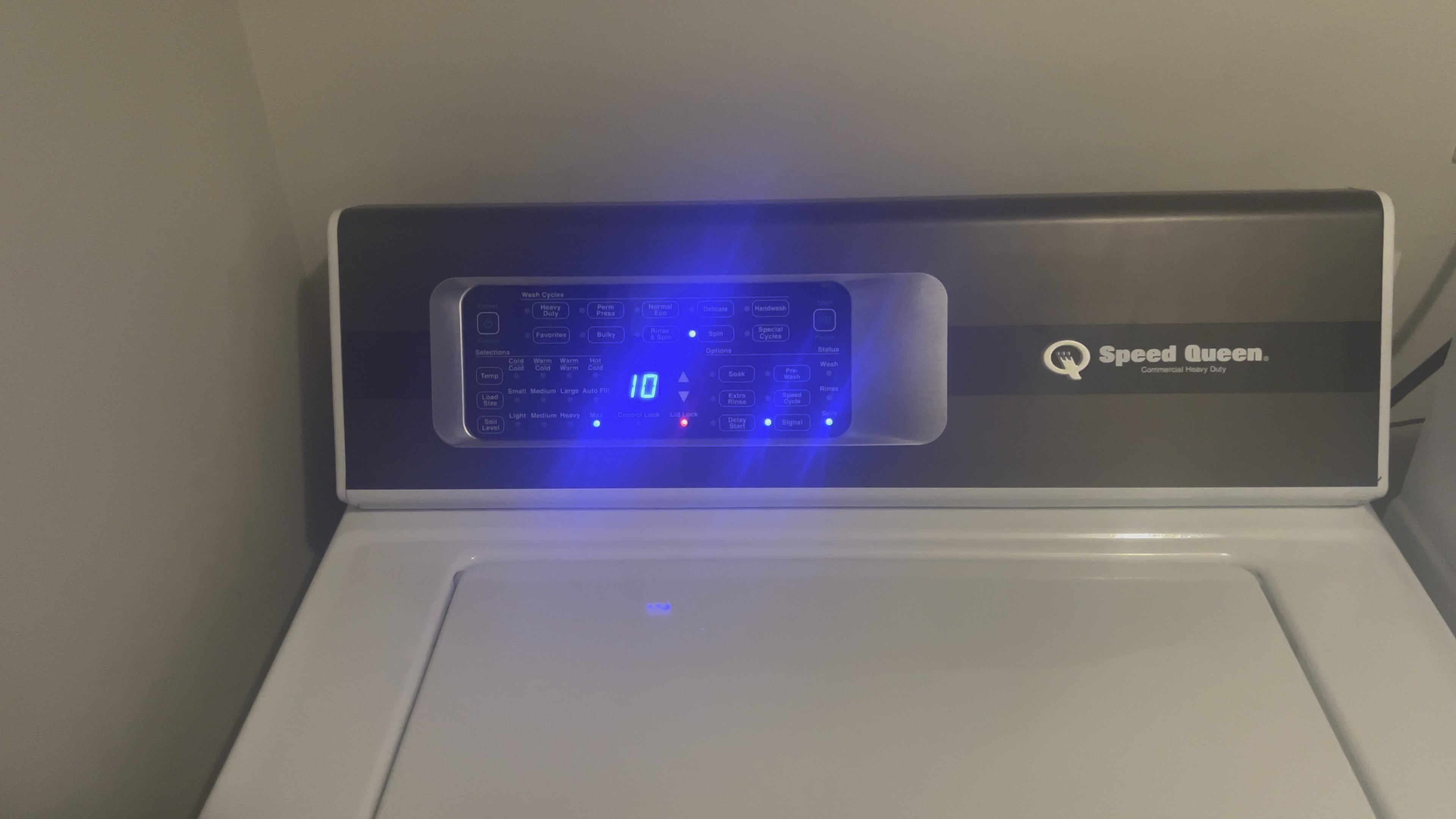
Speed Queen washer error codes are diagnostic signals displayed on the control panel that indicate specific faults such as fill failures (E1), drain problems (E2), door lock issues (E3/E8), motor faults (E6), and overflow errors (E9). Most of these codes can be resolved at home by checking water supply hoses, cleaning the drain pump filter, resetting the control board, or reseating wire harnesses before calling for expensive service.
What Are Speed Queen Washer Error Codes and What Do They Mean?
Speed Queen washer error codes are alphanumeric signals that appear on the digital display when the machine detects a malfunction. These codes help you pinpoint the exact problem without guessing, saving you time and money on unnecessary service calls.
Speed Queen manufactures both top-load and front-load washers with electronic controls. Depending on your model series—TC5, TR3, TR5, TR7, or FF7 front load—the display system and available codes can vary.
Below is a comprehensive reference table of the most common Speed Queen washer error codes and their meanings.
| Error Code | Meaning | Common Cause |
|---|---|---|
| E1 | Fill failure | Water supply off, clogged inlet screens, faulty water valve |
| E2 | Drain failure | Blocked drain hose, clogged pump filter, failed drain pump |
| E3 | Lid/door open or unlocked | Broken lid switch, faulty door latch, loose harness |
| E4 | Load out of balance | Uneven clothing distribution, worn suspension rods |
| E5 | Temperature sensor error | Failed thermistor, broken wire to temperature sensor |
| E6 | Motor or direct drive fault | Worn motor, failed motor control board, loose drive belt |
| E7 | Communication error between boards | Loose ribbon cable, damaged main control board |
| E8 | Door lock malfunction (front load) | Failed door lock assembly, stuck latch mechanism |
| E9 | Overflow detected | Stuck water valve, failed pressure switch, suds buildup |
| E10 | Pressure switch fault | Blocked air hose, failed pressure switch, damaged wiring |
How to Fix Speed Queen Washer Error Code E1 Fill Failure
Error code E1 means the washer failed to fill with water within the expected time. This is one of the most common issues Speed Queen owners encounter and it is almost always tied to the water supply system.
Cause 1: Water Supply Valves Are Closed or Restricted
Start by checking that both hot and cold water valves behind the washer are fully open. Partially closed valves reduce flow enough to trigger the fill timeout and the E1 code.
Inspect the supply hoses for kinks, crushing, or internal blockages. Replace old rubber hoses with braided stainless steel lines to prevent future restrictions.
Cause 2: Clogged Water Inlet Screens
Water inlet valves on Speed Queen washers have small mesh screens that trap sediment and mineral deposits. Over time these screens clog and reduce water flow dramatically.
- Turn off both water supply valves completely.
- Disconnect the supply hoses from the back of the washer.
- Locate the small mesh screens inside the inlet valve ports.
- Use needle-nose pliers or a small pick to remove the screens.
- Rinse under running water and scrub with a soft toothbrush.
- Reinstall the screens, reconnect hoses, and turn the water back on.
Cause 3: Failed Water Inlet Valve Solenoid
If water supply and screens are clear but the washer still shows E1, the inlet valve solenoid may have failed. Test the solenoid coils with a multimeter for continuity. A reading of infinite resistance means the valve needs replacement.
How to Fix Speed Queen Washer Error Code E2 Drain Problem
Error code E2 indicates the washer could not drain water within the allowed cycle time. This is usually caused by a blocked drain path rather than a failed pump.
Cause 1: Blocked or Kinked Drain Hose
Pull the washer out and inspect the entire drain hose. Look for kinks, clogs, or a hose pushed too far into the standpipe causing siphoning issues.
Flush the hose with hot water and a vinegar solution to dissolve lint buildup. Ensure the drain hose does not extend more than eight inches into the standpipe.
Cause 2: Clogged Drain Pump Filter or Impeller
Lint, coins, and small debris can accumulate around the drain pump impeller and prevent proper drainage. Access the pump by removing the bottom service panel on front-load models or the pump assembly on top-load models.
- Place a shallow pan or towel under the pump area to catch residual water.
- Remove the pump filter or access cap slowly.
- Clean out all debris, lint, and foreign objects.
- Spin the impeller by hand to ensure it moves freely.
- Reassemble and run a drain-only cycle to verify the fix.
Cause 3: Failed Drain Pump Motor
If the drain path is clear but the pump makes no sound during the drain cycle, the pump motor may be burned out. Test for voltage at the pump connector during drain. If voltage is present but the pump does not run, replace the drain pump assembly.
Speed Queen Washer E3 and E8 Error Codes Lid and Door Lock Issues
Error codes E3 and E8 both relate to the lid or door locking mechanism. E3 is for top-load lid problems and E8 is for front-load door lock issues. Both codes prevent the machine from starting or completing a cycle for safety reasons.
Top Load Models (TC5, TR3, TR5, TR7): E3 Fix
- Check that the lid is fully closed and seated properly on the cabinet.
- Inspect the lid strike or hook for cracks, bends, or misalignment.
- Test the lid switch with a multimeter for continuity when the lid is closed.
- Reseat the wire harness connecting the lid switch to the control board.
- Replace the lid switch assembly if it fails the continuity test.
Front Load Models (FF7): E8 Fix
- Open the door and inspect the latch hook and strike plate for damage.
- Check that the door seal is not bunching and preventing the door from fully latching.
- Test the door lock solenoid by listening for a click when the lock engages.
- Replace the door lock assembly if the solenoid does not activate.
How to Fix Speed Queen Washer E4 Unbalanced Load Error
Speed Queen washers use sensors to detect load balance. Error code E4 appears when the machine cannot balance the load during spin, causing vibration shutdown.
Step-by-Step Balance Fix
- Open the lid or door and manually redistribute the clothing evenly around the drum.
- Do not overload the washer. Keep loads to no more than two-thirds of the drum capacity.
- Wash heavy items like towels or jeans in balanced pairs rather than single items.
- Run a rinse and spin-only cycle to clear the error and complete the wash.
When E4 Keeps Repeating: Worn Suspension Components
If the error keeps returning even with properly balanced loads, the suspension rods (top load) or shock absorbers (front load) may be worn. Worn suspension causes the drum to wobble excessively and triggers repeated imbalance errors.
Top-load Speed Queen models use four suspension rods that can be replaced one at a time without disassembling the tub. Front-load models require replacing the front and rear shock absorbers accessible through the front and back panels.
Speed Queen Washer E6 Motor Error and E7 Communication Error Explained
Error codes E6 and E7 point to electrical issues involving the motor or the communication between control boards. These are the most complex codes and may require parts replacement.
E6 Motor Fault: Causes and Diagnosis
Check the drive belt on belt-driven models for looseness, fraying, or breakage. On direct-drive models, inspect the motor coupling or direct drive connection for cracks.
Test motor windings with a multimeter. Speed Queen motors typically show a resistance between 2 and 10 ohms across windings. A reading outside this range means motor replacement is needed.
Also inspect the motor control board for visible burn marks, swollen capacitors, or corrosion around the connector pins.
E7 Communication Error: What to Check
This code means the main control board and the motor control board cannot communicate. It is most commonly caused by a loose or damaged ribbon cable or wire harness between the two boards.
- Unplug the washer and wait two minutes.
- Remove the top or back panel to access both control boards.
- Disconnect and reconnect every wire harness and ribbon cable on both boards.
- Inspect the connectors for corrosion, burnt pins, or bent contacts.
- Plug the washer back in and check if the code clears.
If the code persists after reseating all connections, the main control board may need replacement. Speed Queen control boards are model-specific, so match the exact part number to your serial plate before ordering.
How to Reset a Speed Queen Washer After an Error Code
A hard reset clears most temporary error codes and restores normal operation without any part replacement.
- Unplug the washer from the wall outlet.
- Wait a full 60 seconds to allow the control board to fully discharge.
- Plug the washer back in.
- Open and close the lid or door once to reset the lock sensor.
- Start a short cycle to confirm the error code is gone.
If the error code returns immediately, the underlying hardware issue has not been resolved and further diagnosis is required using the specific code sections above.
Speed Queen Washer Model-Specific Error Code Differences
Not all Speed Queen washers display errors the same way. Your model series determines how codes appear and which codes are available.
| Model Series | Display Type | Notable Differences |
|---|---|---|
| TC5 Top Load | LCD digital display | Shows E-series codes, easier to read |
| TR3/TR5/TR7 Top Load | LCD with touch controls | Additional sensor codes like E10 pressure switch |
| FF7 Front Load | LCD with door lock indicators | E8 door lock codes are more common on this series |
| Commercial Models (SC) | LED segment display | Use simplified numeric codes, consult service manual |
Frequently Asked Questions About Speed Queen Washer Error Codes
Why does my Speed Queen washer keep showing the same error code after a reset?
If the error code returns after a hard reset, the physical component causing the fault has not been repaired. The reset only clears temporary software glitches, not hardware failures.
Can I use my Speed Queen washer if it shows an error code?
No. Speed Queen designs error codes to lock out specific functions to prevent water damage or electrical hazards. Resolve the underlying issue before running another cycle.
Do Speed Queen washers store error code history in their memory?
Yes. On models with LCD displays, you can typically access stored fault codes by pressing and holding a combination of buttons on the control panel. Consult your specific model service guide for the exact button sequence.
What does it cost to repair a Speed Queen error code issue?
Simple fixes like cleaning inlet screens or replacing a lid switch cost under fifty dollars in parts. Motor and control board replacements can range from two hundred to four hundred dollars, still significantly less than a full washer replacement.
Should I call a technician for any Speed Queen error code?
Try the DIY fixes in this guide first for codes E1 through E4 and simple lid or door issues. For E6, E7, and persistent E8 codes involving control boards and motors, professional service is recommended if you are not comfortable working with electrical components.
Final Words on Speed Queen Washer Error Codes
Speed Queen washer error codes are designed to make troubleshooting faster and more precise, not more complicated. Most codes—especially fill, drain, and balance errors—are fixable at home with basic tools and about thirty minutes of work.
Take the time to identify the exact code on your display, match it to the guide above, and work through the causes in order. You will almost always find the problem before a service technician ever needs to visit, and you will save hundreds in the process.